
Best AI Video Generator for Creating Micro-Dramas (2026 Guide)
Comparing 5 AI video tools for solo creators making 1–3 minute vertical episodic dramas — no studio or editing skills needed.
TL;DR
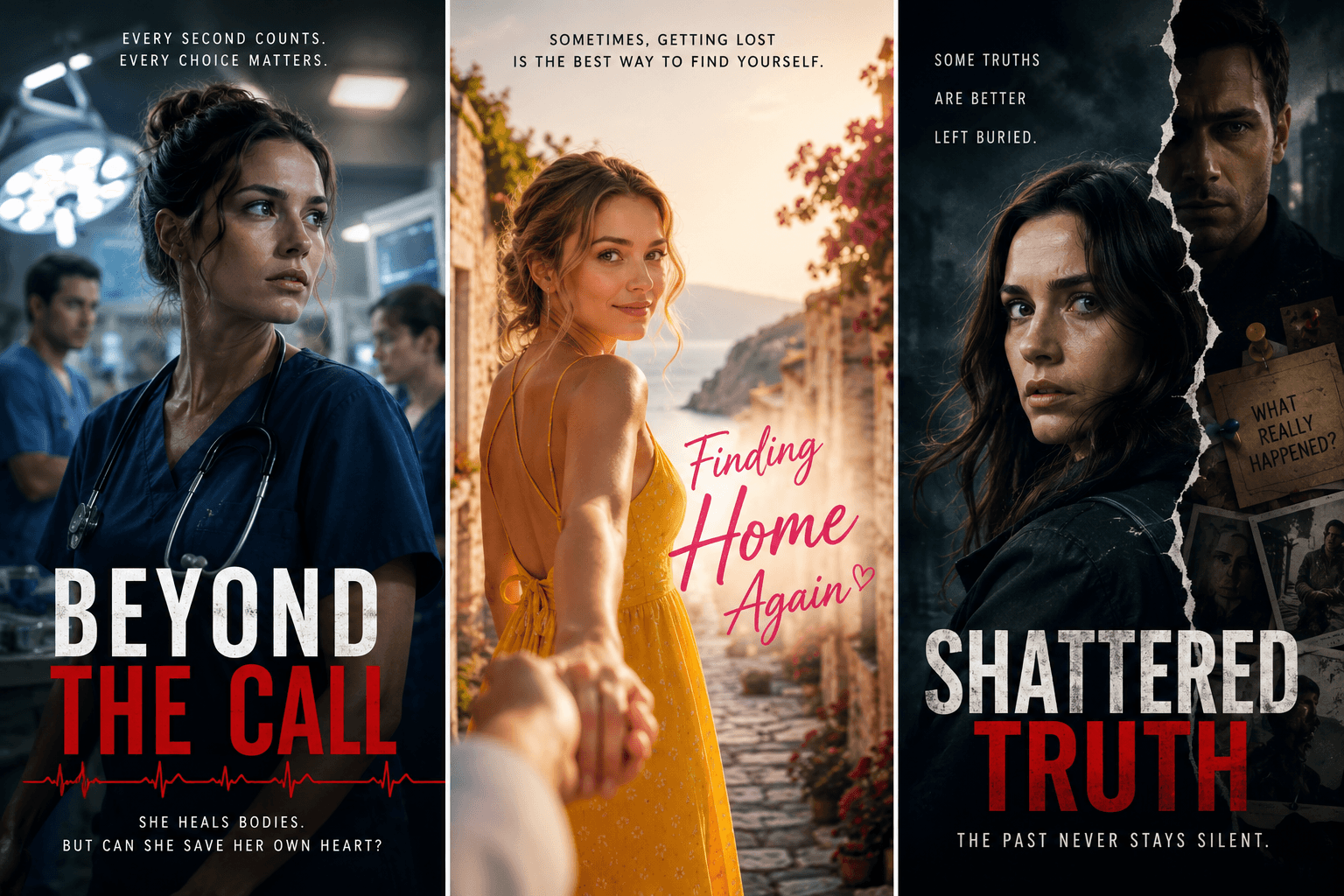
For solo creators producing vertical episodic dramas, Crreo AI is a strong fit for micro-drama — character and scene continuity, multi-character dialogue, automated storyboard generation, 9:16 export, and a unified timeline that brings together auto-generated visuals, voiceover, background music, sound effects, subtitles, and thumbnails. 200+ voices, 80+ languages, episodes up to 30 minutes. Free plan, no card.
-
Character and scene continuity between clips is a recurring challenge for serialized formats. Many AI video models drift between shots — a different face here, a different scene look there. Crreo holds character identity and scene continuity at the project level, with characters reusable across episodes.
-
Multi-tool stacks pile up subscription costs, and credit-based generation tools can get expensive quickly. Crreo uses flat monthly pricing (not per-credit), generally more cost-effective at daily cadence. From $0 (Free) or $14/mo (Start).
Ready to start creating?
See what results Crreo can get for you.
Why most AI video tools struggle with micro-drama (and how Crreo addresses it)
Most AI video generators were not designed for serialized vertical drama. The table below maps the recurring production problems to the Crreo capabilities that address them.
| Production problem | What it breaks for micro-drama | Crreo capability that addresses it |
|---|---|---|
| Character identity drift across clips | Serialized storytelling — character changes are easy for audiences to spot across episodes | Character Consistency System + Reusable Character Library for recurring characters across episodes |
| Short clip-length limits in many generative video tools | Episode-length output (60–180 sec) without manual stitching | Single-project workflow up to 30 minutes per episode |
| No script-to-storyboard workflow layer | Daily or weekly publishing cadence | Full-script processing + automated AI storyboard generation |
| Single-shot, single-speaker tooling | Multi-character dialogue scenes | Dialogue mode with up to 4 characters per scene and separate voice assignment |
| Flat emotional delivery in some TTS workflows | Emotional beats that drama depends on | Voxu Actor voice control (Pro plan and above) layered on 30+ Multilingual customizable; 200+ voices total |
| English-only or limited-language voiceover | International market distribution | 200+ voices across 80+ languages, language-aware end-to-end |
| Background music and SFX juggled across separate apps | Episode pacing and emotional rhythm | Built-in Background Music Maker + context-aware SFX |
| 16:9-first composition with vertical crop | TikTok / Shorts / Reels native framing | Native 720×1280 (9:16) export |
| Subtitle generation and sync as a separate manual step | Silent-watching audiences on vertical platforms | Auto subtitle generation aligned to narration timing |
| Script revisions force regenerating each affected scene | Iteration speed on a daily publishing cadence | Text-Driven Editing — script edits auto-update visuals and narration |
| Thumbnail / cover production per episode | Click-through on vertical platforms | Auto thumbnail generation when each project completes |
| Credit-based billing where each regeneration re-runs the meter | Cost predictability when multiple attempts are needed per scene | Production volume measured in monthly video minutes rather than per-generation credits |
What is the best AI video generator for creating micro-dramas?
A useful AI video generator for serialized micro-drama is one that holds the same character across an entire script and exports 9:16 episodes in one workflow. Crreo AI is a strong fit on that criterion. Other tools — single-clip generators, cinematic scene visualizers, and animated short platforms — cover narrower use cases.
How top AI video tools compare for micro-drama creators
The capability table compares Crreo AI, Magiclight, LTX Studio, Hailuo, and Veo.
Capability comparison: Crreo AI vs other AI video tools
| Capability for micro-drama | Crreo AI | Magiclight | LTX Studio | Hailuo | Veo |
|---|---|---|---|---|---|
| Project-level character consistency | Yes (Character Consistency System) | Yes | Per-scene | Per-clip | Per-clip |
| Episode-length output in one project | Up to 30 min per project | Up to 50 min per project | See vendor | Per-clip (~6 sec) | Per-clip (~8 sec) |
| Multi-character dialogue in a single scene | Yes (Dialogue mode, up to 4 characters) | Yes | See vendor | Single-clip generation | Single-clip generation |
| Voice library | 200+ voices, 80+ languages | See vendor | 30 voices | 300+ voices, 40+ languages | See vendor |
| Pricing model | Subscription, minutes/month (regenerations included in plan) | Credit-based subscription | Credit-based subscription | Credit-based — see vendor | Bundled in Google AI plans — see vendor |
Disclaimer: Verified May 17, 2026. Pricing, limits, and features change frequently — check each tool’s pricing page directly for current terms. All trademarks belong to their respective owners.
Crreo AI pricing for micro-drama production
The pricing table below details Crreo’s plans only — the other tools use mixed monthly, credit-based, and bundled pricing, so check their pricing pages directly for current terms.
| Plan | Monthly | Annual | Production volume per month | Notable capabilities |
|---|---|---|---|---|
| Free | $0 (no card) | $0 (no card) | One-time allowance; 30-sec max | Kine 3.2 (720p) video; Kalo XL image; full voice library; watermarked exports |
| Start | $14 | $9/mo | 60 video minutes; 10-min max | + Kine 3.2 (720p); Kalo M image; scene editing; no watermarks |
| Grow | $29 | $18/mo | 120 video minutes; 15-min max | + Kine 3.2 (720p); Kalo L image; photo-based characters; saved character library |
| Pro | $49 | $29/mo | 240 video minutes; 15-min max | + Kine 3.2 (1080p); Kalo XL image; Voxu Actor voice control |
| Ultra | $79 | $45/mo | 480 video minutes; 30-min max | Everything in Pro + early access to new features |
See the Crreo pricing page for current plan details.
Crreo’s 5-step workflow for episodic vertical drama
Crreo handles a micro-drama episode in five steps.
-
Input idea or script and configure setup. Pick 9:16 vertical, 1–3 minute duration, dialogue or narrative story mode (most micro-dramas use dialogue mode), voice, language, and image model. For drama, choose Manual Script mode to keep the dialogue verbatim instead of letting auto-rewrite touch the lines.
-
Select and customize characters. Build 2–4 recurring characters once on the Grow plan or above, save them to the character library, then reuse them across every episode. This is where character consistency is locked in.
-
Edit storyboard scene by scene. Crreo segments the script into scenes aligned with narrative pacing. Many 90-second micro-drama episodes are structured around several short storyboard scenes rather than a single continuous shot. Reorder or delete scenes to fix pacing before generation.
-
Edit timeline and assets. Refine voice delivery, regenerate weak shots, adjust background music and SFX from the in-app music maker. Drama relies heavily on emotional beats — this is where they get tuned.
-
Preview, download, and share. Export MP4 in 9:16 or generate a shareable link. Auto-thumbnail drafts and titles are produced for platform-ready posting.
Time per episode varies by creator and scene complexity. The integrated workflow keeps character setup, voice, music, and subtitles inside one project, which makes daily or weekly publishing sustainable for a solo creator working from a phone. The Usman creator case study reached 54K TikTok followers in 8 months producing narrative short-form content exactly this way. Results vary by creator and publishing consistency.
FAQ
Do I need video editing experience to make AI micro-dramas?
No. End-to-end AI generative video tools generate the storyboard, visuals, narration, music, and subtitles automatically. Most edits are scene-level — reorder, regenerate, swap a shot — not frame-level. Crreo is designed for creators with no editing experience.
How long does it take to produce one micro-drama episode?
Time per episode varies by creator, script complexity, and how many regeneration attempts each shot needs. The integrated workflow keeps voice, music, subtitles, and thumbnails inside one timeline, which removes the export/import overhead of multi-tool stacks. Saved characters in the Reusable Character Library further reduce setup time on every episode after the first one is built.
Can I make micro-dramas with a free AI video generator?
Yes, on the Crreo Free plan. The Free plan is a one-time allowance with a 30-second cap — enough to test a scene or teaser with Crreo's best models before upgrading. Character creation on Free is text-based only — photo-based character upload requires the Grow plan or above. No credit card is required to start the Free plan. Crreo also offers a 7-day free trial on the Grow and Pro plans: the Grow trial unlocks photo-based characters; the Pro trial unlocks Kine 3.2 in 1080p and Voxu Actor voice control.
How long can each AI-generated micro-drama episode be?
On Crreo, episode length depends on the plan. Free supports up to 30 seconds. Start supports up to 10 minutes, Grow and Pro up to 15 minutes, and Ultra up to 30 minutes per project. For 60–90 second vertical episodes typical of micro-drama, any paid plan handles the format with room for longer cuts.
Can AI video generators create micro-dramas in other languages?
Yes. Crreo supports localized workflows across 80+ languages. The same workflow that produces an English episode produces the localized version — script, voice, and subtitle generation are language-aware end-to-end.
Can AI-generated micro-dramas be monetized on TikTok or YouTube Shorts?
Platform monetization policies apply equally to AI-assisted and traditionally produced video. TikTok’s Creator Rewards Program and YouTube Shorts monetization both require originality, watch-time thresholds, and policy compliance. AI-generated micro-dramas that meet those thresholds can be eligible if they meet platform requirements. Results vary by creator and publishing consistency.
Are AI-generated micro-dramas at risk of copyright or content strikes?
Risk depends on the assets used. Crreo primarily generates visuals and voices within the platform rather than relying on stock-footage assembly workflows, which reduces third-party rights conflicts. Creators are still responsible for the script content, music licensing if external tracks are used, and likeness rights when photo-based characters are uploaded. Review TikTok and YouTube content policies before publishing, and use the built-in Background Music Maker to reduce external licensing complexity.
Conclusion
The structural test for any AI video tool in this category is whether episode 30 still looks like episode 1 — without burning through regeneration credits on the way there. Crreo’s Character Consistency System, Reusable Character Library, and flat monthly pricing are built around that test.
Start a vertical drama project on the Crreo AI free plan or compare plan tiers on the pricing page. The Video Maker tutorial walks through the 5-step workflow end-to-end. For long-form video creators, see Crreo’s long-form AI video guide.
Ready to Create Your First Video?
Join thousands of creators who are using Crreo AI to produce professional-quality narrative videos—no film crew required.