
Best AI Video Generator for Long-Form Creators (2026 Guide)
Generate 30-minute narrative videos from script—no avatars, no stock footage hunting, just pure storytelling.
For creators making 10-30 minute videos, a well-suited AI video generator is one that treats the entire video as a single, coherent project—not a collection of stitched clips.
Crreo AI is the top choice for its script-driven, long-form storytelling, without avatars or stock footage hunting.
Ready to start creating?
See what results Crreo can get for you.
Why Crreo AI Is Optimized for Long-Form Creators
Unlike tools built for short social clips such as InVideo or corporate training platforms such as Synthesia, Crreo is designed for narrative storytelling.
Fully AI Generative
Instead of stitching together unrelated stock footage, Crreo uses a fully generative approach to create consistent characters, voiceovers, and environments that persist across the entire timeline.
Single-Flow Experience
Users can manage scripting, storyboarding, and timeline editing in one interface, eliminating the need to export fragmented clips to external editors like Premiere Pro.
Predictable Pricing
The platform offers transparent plans with clear usage limits, including a high-allowance Ultra plan, giving creators flexibility to work on large projects without the 'credit anxiety' often associated with pay-per-minute plans.
Why Is Generative AI Better Than Stock Footage or Avatars?
Most creators struggle with long-form AI video because they use the wrong type of tool.
The Problem with Stock
Tools that rely on stock footage search often result in the “Frankenstein Effect,” where lighting, style, and tone clash from one scene to the next.
The Problem with Avatars
Talking heads are great for HR training, but often result in low viewer retention on YouTube due to visual monotony.
The Generative Advantage
Crreo’s generative approach ensures visual continuity. The model understands the script’s context, keeping the viewer immersed in the story.
What Types of AI Video Generators Are Available?
When people search for an AI video generator for long-form videos, they often compare tools originally built for very different types of content creation. Understanding these differences helps explain why some tools work well for short or structured videos, while others are better suited for long-form, narrative-driven content.
In practice, most AI video tools fall into two broad categories: business-oriented and creator-oriented. Within creator tools, the main differences lie in how visuals are produced and how much creative control is maintained across longer videos.
Business-focused AI video tools
Platforms such as Synthesia and HeyGen are great for business communication, including training videos, onboarding materials, and internal presentations.
These tools typically use on-screen AI avatars and presentation-style layouts. This approach works well when the goal is clear, concise delivery of information, but it tends to feel repetitive over longer runtimes. For extended videos, visual variety and narrative flexibility are limited, which is why these tools are less commonly used for long-form creative content.
Creator-focused AI video tools
Creator-oriented platforms are designed around storytelling, education, and narrative content. Instead of focusing on a single presenter or slide format, they aim to support visual flow, pacing, and scene transitions across longer videos.
Within this category, tools generally differ in how visuals are sourced and assembled.
Stock-based AI video tools
Tools such as InVideo and Pictory primarily construct videos by retrieving stock footage and images that match keywords in a script. While these platforms increasingly use AI to generate voiceovers, captions, and supplemental visual clips, their core workflow relies on assembling pre-existing media assets rather than synthesizing the full video narrative from scratch.
This approach offers more visual variation than avatar-based tools and works well for short explainers, marketing videos, and list-style content where scenes are loosely connected. However, as videos get longer, creators often encounter repetition and weaker alignment between visuals and narration. Because the core structure still relies on pre-existing assets and templates, maintaining a cohesive visual narrative across many scenes typically requires manual adjustments and editorial intervention.
End-to-end generative video tools
One major category of creator-focused tools approaches long-form video creation by treating the entire video as a single, script-driven system rather than a sequence of assembled clips. In this model, visuals are generated directly from the narrative itself, with continuity, pacing, and tone managed across the full runtime.
Crreo is built around this end-to-end generative paradigm. Instead of relying on avatars, templates, or stock libraries, it translates full scripts into cohesive visual narratives, maintaining scene consistency and visual identity as video length increases.
This approach addresses the structural limitations that typically emerge in long-form AI video creation—such as fragmented workflows, visual drift, and manual post-production overhead. Tools that operate at the script level, rather than the clip or asset level, are better aligned with how long videos are planned, edited, and produced as a single creative system.
AI Video Tools Comparison 2026
| Tool | Video Creation Approach | Max Length Per Video (Individual plan) | Individual Monthly Price | Pricing Model | Typical Use Case |
|---|---|---|---|---|---|
| Crreo AI | AI generative | 30 min | $14–$79 | Subscription (Ultra plan available) | Explainers & Storytelling |
| InVideo | Stock Footage Assembly + Generative Clips | 30 min | $20–$1000 | Credit-based | Marketing & Ads |
| Pictory | Stock Footage Assembly | 30 min | $29–$59 | Subscription | Blog-to-Video |
| Fliki | Stock Footage Assembly + Generative Clips | 40 min | $28–$88 | Credit-based | Audio-to-Explainers |
| Magiclight | AI‑generated 2D Animation | 50 min | $38–$150 | Credit-based | Cartoon & Animation |
| Mootion | AI-native storyboard | Not specified | $15–$200 | Credit-based | Animated storytelling |
Selection Criteria: Tools were selected based on their relevance for creators making long-form videos as of May 12, 2026. Ratings for "Beginner Friendly" and "Visual & Audio Consistency" reflect our editorial opinion based on hands-on testing of 30-minute narrative workflows.
Pricing & Limits: Data reflects standard individual monthly plans (excluding Team/Enterprise tiers and annual discounts) collected from official provider websites. "Max Length Per Video" and pricing limits refer specifically to individual creator plans, not enterprise custom agreements. Feature classifications (e.g., "Stock Footage Assembly") describe the primary technical method used to create video content.
Disclaimer: Competitor pricing, limits, and features are subject to change. This comparison is for informational purposes only and does not constitute a guarantee of performance. All trademarks belong to their respective owners.
Why Is It Hard to Make Usable Long Videos with AI?
Many AI video apps can struggle with long YouTube videos because they were originally optimized for short clip generation, not to manage a single video that runs 30 minutes. From a technical perspective, generating long, continuous video sequences is significantly more demanding in terms of computation, memory, and consistency, so many tools cap each generation at under a minute.
As video length increases, scene consistency becomes harder to maintain. Characters, environments, and visual style often drift from one clip to the next, especially when scenes are generated independently. At the same time, cost structures push many platforms to optimize for short outputs, since longer generations are more expensive to run and harder to scale reliably.
This is why long-form AI video creation is less about raw generation power, and more about whether a platform can maintain consistency and stability across scenes without forcing creators to manually stitch clips together — a distinction that separates short-form tools from systems designed for long videos.
As a result, creators trying to build long-form videos often run into the same set of failure points:
Strict video duration limits (30–60 seconds)
Many generative AI video tools have historically been optimized for short clips (often under a minute), which can force creators to break a single long video into dozens of separate clips. In practice, this is not just an inconvenience — it creates a manual stitching problem that is difficult to manage at scale.
Each clip is generated independently, with no shared timing, pacing, or transition logic. Creators must manually align scenes, smooth transitions, and adjust timing across dozens of fragments. As the number of clips increases, even small inconsistencies compound, making it hard to maintain narrative flow or a professional viewing experience in long videos.
Platforms designed specifically for long-form workflows treat a 30-minute video as a single structured project rather than a collection of clips. Crreo AI follows this model by managing structure, timing, and transitions across the entire video, significantly reducing the need for manual stitching and helping maintain stability across longer projects.
Lack of visual consistency and character drift
Long-form videos depend on stable characters, environments, and visual tone across many scenes. However, most AI video models generate each scene independently, without persistent memory or shared context from earlier outputs. As a result, characters may subtly change in appearance, lighting may shift, or the overall style may drift from one scene to the next. This phenomenon — often called character drift or visual drift — is one of the primary reasons AI-generated long videos can feel amateur or unreliable.
The underlying challenge is technical. Maintaining consistency across a 10–30 minute video requires coordinating visuals, dialogue, sound, and pacing across dozens of scenes while preserving a shared identity. Crreo AI directly addresses these challenges by streamlining the most complex aspects of long-form production — specifically character consistency, scene stability, and integrated workflow orchestration.
Crreo AI is designed to achieve this visual stability through several technical approaches:
-
Orchestrates with an AI "director" layer: Coordinates visuals, speech, sound, and pacing across every scene, rather than generating scenes in isolation.
-
Preserves identity with proprietary consistency techniques: Working to maintain character appearance and visual identity while still allowing variation in expressions, camera angles, and environments.
-
Defines flexible character and object parameters: Enables creators to define, customize, and reuse characters or visual elements — across any style — throughout an entire video.
Fragmented audio and multi-modal workflows
Some AI video tools do not support audio at all, requiring creators to add voiceovers, background music, and subtitles in separate software. Others do include audio generation, but handle it on a per-clip basis rather than as part of a unified timeline.
In both cases, audio and visuals are not managed as a single system. Creators are left manually re-integrating narration, music, and subtitles across dozens of clips, which makes synchronization, pacing, and tone control especially difficult in long-form content. Even small timing mismatches can compound over a 30-minute video, increasing production effort and undermining the promise of AI-driven automation — particularly for solo creators and beginners.
Crreo AI is designed to streamline this fragmentation by treating audio and visuals as tightly coupled components of the same creative system. Instead of generating media in isolation, Crreo AI manages voiceovers, background music, sound effects, subtitles, and visuals within a single timeline governed by shared timing and narrative context.
From a technical standpoint, this is achieved by:
-
Implementing a unified scene and timeline model, where dialogue, visuals, and audio are generated and adjusted together rather than stitched after the fact.
-
Centralizing pacing and synchronization control, ensuring that narration length, scene duration, and transitions remain aligned across the entire video.
-
Providing integrated editing and personalization, allowing creators to fine-tune audio, visuals, and timing without regenerating the whole video or switching tools.
By solving audio and visuals together at the system level, end-to-end workflows reduce manual integration work and make long-form AI video creation more stable, predictable, and scalable.
What Should I Look for in an AI Video Generator?
When evaluating AI video generators for long videos, the key question is whether a tool can reliably support a 30-minute workflow from start to finish.
Many platforms advertise AI video generation, but only a subset are designed to handle long-form structure, consistency, and editing without forcing creators into heavy manual work.
If you're trying to make long videos without constantly stitching clips, fixing audio, or redoing scenes, these are the things you should care about.
Maximum video length and scene limits
Long videos require flexible support for extended runtimes and many scenes within a single project. Many AI video tools still cap outputs at 30–60 seconds per generation or impose strict scene limits, which forces creators to manually stitch dozens of clips together as videos get longer.
Tools built specifically for long-form workflows take a different approach: they prioritize completion and structural stability over short-term visual effects. Crreo follows this model by treating a 30-minute video as one continuous, scene-based project rather than a collection of isolated clips.
This design choice favors consistency, pacing, and reliability over flashy one-off effects. As a result, it is best suited for creators who care more about finishing cohesive long-form videos at scale than chasing momentary virality through heavily stylized individual shots.
Support for longer script-to-video workflows
Long-form content works particularly well when creators can start from a complete script or structured outline. Tools that rely on short prompts or clip-by-clip input make it difficult to maintain narrative flow.
Crreo supports full script-based workflows. It can process long scripts directly, generate a structured storyboard, and allow pacing, emphasis, and transitions to be refined at the project level rather than regenerated scene by scene.
Visual and character consistency across scenes
Maintaining visual and character consistency is one of the hardest problems in long AI-generated videos. Characters, environments, and style need to remain stable from the first scene to the last.
Crreo is designed to maintain shared context across scenes by treating the video as a single creative system, thanks to technology for character and scene consistency such as an AI director agent controlling visuals, dialogue, music, and sounds in every scene, proprietary character injection techniques, and the use of advanced visual models. Characters and visual identity persist throughout the project while still allowing variation in camera angle, composition, and scene design.
Voiceover and background music integration
Long videos require synchronized visuals, narration, background music, and subtitles. Some tools lack audio support entirely, while others generate audio on a per-scene basis, making pacing difficult to control.
Crreo integrates visuals and audio together within one timeline, supporting multiple languages and voices. Voiceover, background music, sound effects, and subtitles are generated and adjusted alongside visuals, making alignment and pacing easier to control without external tools.
Scene editing and timeline control
As video length increases, creators need the ability to refine pacing, reorder scenes, and adjust transitions without regenerating the entire video. Tools that only offer one-click generation often force creators to start over when changes are needed.
Crreo integrates editing directly into the workflow. Scene-level editing and timeline control allow creators to adjust timing, rearrange segments, and refine transitions while keeping the rest of the video intact, which is essential for producing polished long-form content efficiently.
Transparent pricing without confusing credits
Many AI video tools rely on credit-based pricing models, where each generation consumes an opaque number of credits. For long videos, this makes costs difficult to predict, especially when revisions or multiple scenes are involved.
Crreo uses a generation-based allowance, making usage predictable when creating and refining long videos, especially for creators who publish consistently.
Top Use Cases for Long-Form AI Video
Long-form generative AI video works very well for content that is script-driven, faceless, explainer-focused, and narrative-focused, where visual consistency, pacing, and audio integration matter more than real-world footage or on-screen presenters.
These formats benefit most from end-to-end generative systems that create visuals directly from scripts, maintain continuity across scenes, and manage audio and editing within a single workflow. Crreo is designed around this long-form structure rather than short, clip-based generation.
Faceless YouTube videos
Faceless channels are one of the strongest use cases for long-form generative AI video. Without an on-camera host, creators rely entirely on narration, visuals, and pacing to retain attention over 10–30 minutes.
Crreo converts full scripts into structured scenes with a consistent visual style and integrated voiceover. This allows creators to publish long videos regularly without filming, lighting, or manually stitching short clips together.
Explainers and educational videos
Explainers and educational videos follow a clear, script-based structure—introducing concepts, building context, and reinforcing ideas over time.
Long-form generative AI video supports this format by aligning each section of the script with a corresponding visual scene while keeping narration, subtitles, and pacing synchronized throughout the video. Crreo supports this alignment within a single workflow, reducing the need for slide decks or external editing tools and making longer educational videos easier to produce and refine.
Storytelling and video essays
Narrative-driven content like video essays, commentary, and analytical storytelling depends heavily on visual continuity and controlled pacing.
Crreo generates visuals that follow the structure and intent of the narrative itself rather than loosely matching keywords. Scene-level consistency and tone are preserved across the entire video, helping long-form stories feel cohesive rather than assembled from unrelated fragments.
Book-to-video adaptations
Turning books, essays, or long written content into video is a natural fit for generative AI workflows.
Crreo can process long scripts, generate storyboards automatically, and produce extended videos that mirror the structure of the original text. This significantly reduces the manual effort required to match narration, visuals, and pacing across dozens of scenes.
Meditation and relaxation videos
Meditation and relaxation content prioritizes atmosphere, stability, and smooth transitions rather than rapid visual changes.
Crreo is designed to maintain consistent visuals and synchronized audio over long durations, enabling uninterrupted videos without looping short clips or juggling multiple tools. The platform also includes voices suited to meditation and soothing styles.
Commentary, analysis, and review channels
Commentary, analysis, and review channels are well-suited for long-form generative AI video because they are driven primarily by opinions, explanations, and structured arguments rather than real-world footage or on-screen reactions.
Crreo transforms long scripts into cohesive visual narratives that support the spoken analysis. By avoiding repetitive assets and rigid templates, it helps creators maintain clarity, pacing, and visual coherence across 10–30 minute videos while staying fully faceless.
Evergreen news explainers and contextual breakdowns
Evergreen news explainers focus on background, causes, and long-term implications rather than real-time reporting. This makes them a strong fit for long-form AI video generation.
Crreo supports this format by visualizing complex topics consistently across scenes without relying on live footage. Script-first generation and scene continuity make it easier to produce informative long videos without sourcing or licensing external media.
Historical and timeline-based content
Historical videos and timeline-driven narratives are another strong use case for long-form generative AI video, especially when original visuals are limited or fragmented.
Crreo translates written timelines into sequential scenes managed within a single project. This helps preserve narrative structure and visual stability, which improves comprehension and retention in long-form historical content.
Conceptual and abstract topics
Abstract topics such as philosophy, economics, systems thinking, or theoretical frameworks often lack concrete visuals, making them difficult to present with traditional video tools.
Crreo helps creators design consistent visual language, tone, and pacing across scenes, supporting complex ideas over long videos without distraction or stylistic drift.
How to Create a 30-minute Video with Crreo AI? (Step-by-Step)
Creating a 30-minute video with AI works very well when the process is organized as a single, continuous workflow rather than a series of disconnected clip generations. Crreo simplifies long-form production by combining scripting, visuals, audio, editing, and export into one system.
Below is a streamlined 5-step process that balances creative control with speed, especially suitable for beginners.
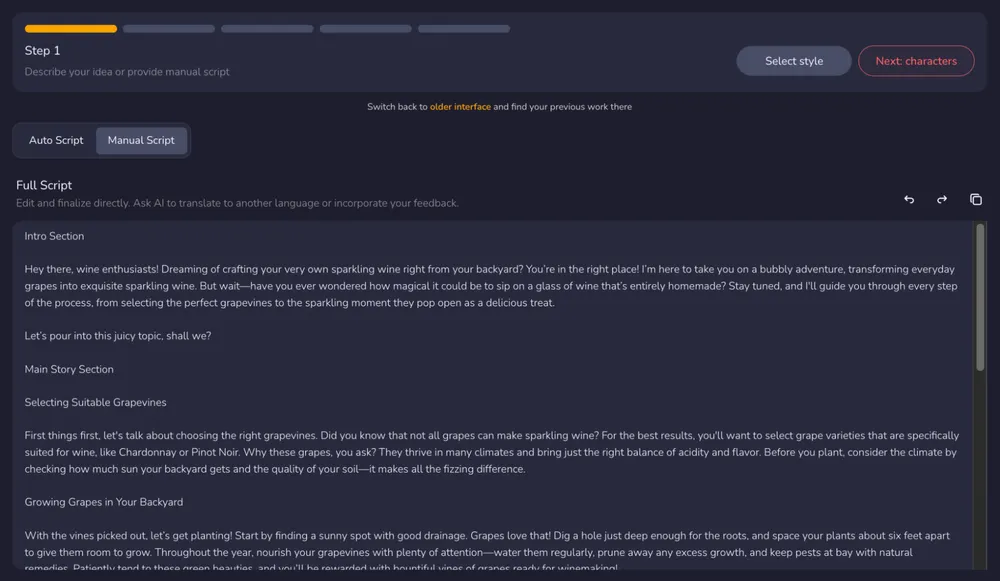
Step 1: Start with an idea or a full script
Begin by entering either:
- a topic or idea (Auto Script mode), or
- a pre-written long script (Manual Script mode)
At this stage, creators can define style, tone, voice, language, and target duration using a unified style selector. This script-first approach helps the entire 30-minute video be planned as a whole rather than assembled from short, unrelated clips. 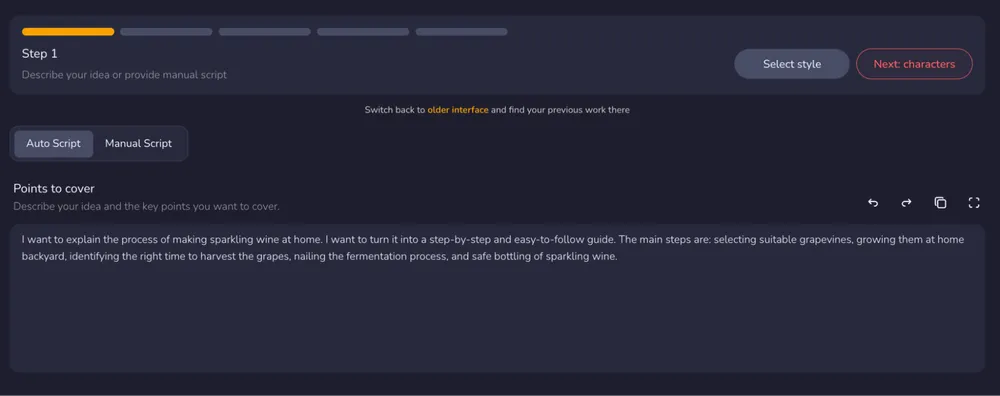
Step 2: Add characters (optional)
If the video requires specific characters or visual personas, creators can select from existing templates or create new ones.
If no characters are specified, the AI automatically generates appropriate visuals based on the script context.
This optional step keeps the workflow flexible: beginners can skip character design entirely while still maintaining visual consistency across scenes. 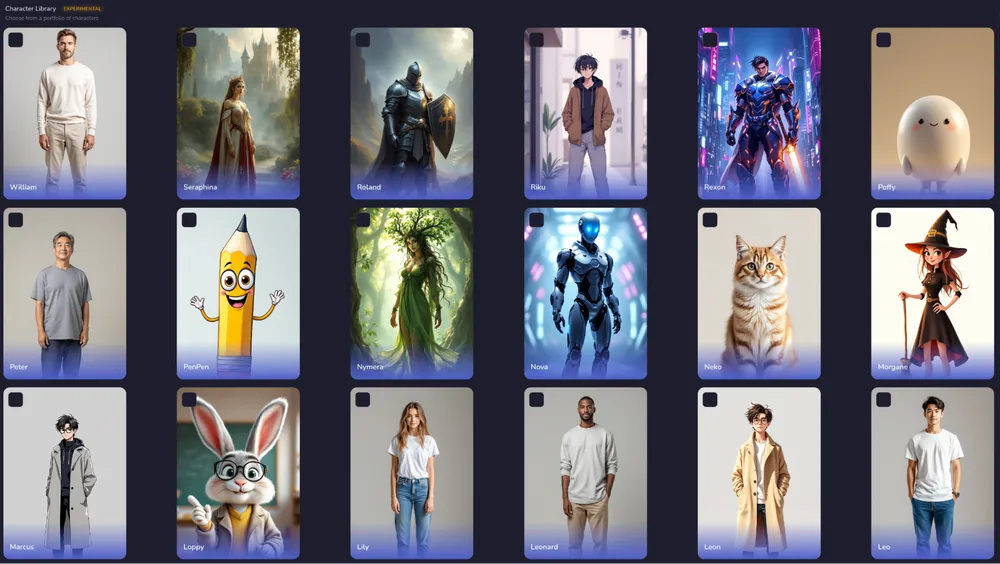
Step 3: Generate and edit the storyboard
The AI converts the script into a structured storyboard, breaking the video into logical scenes represented by static images.
Creators can then reorganize, edit, or delete scenes to better match their narrative intent. This storyboard stage dramatically reduces the time normally spent manually aligning narration with visuals in long-form videos. 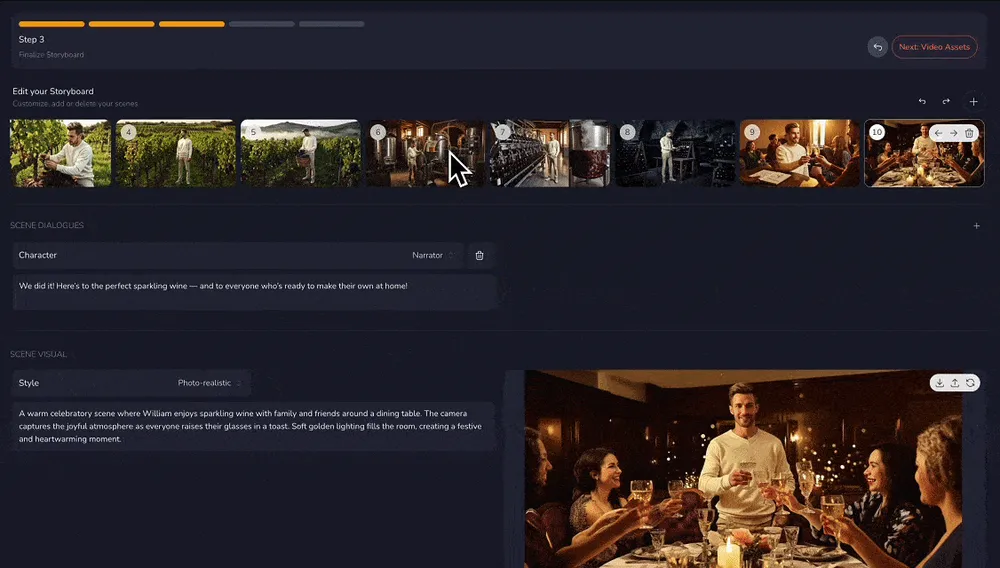
Step 4: Review and edit all assets in one timeline
All video assets—visuals, voiceover, background music or sound effects, subtitles, and the thumbnail—are accessible from a single integrated timeline.
Instead of regenerating entire clips, creators can adjust pacing, reorder scenes, refine transitions, and fine-tune audio directly within the project. Individual images and scenes can also be edited quickly and accurately using simple, intuitive prompts, making visual adjustments fast without breaking overall consistency. This level of control is especially important for producing polished 30-minute videos without relying on external editing software. 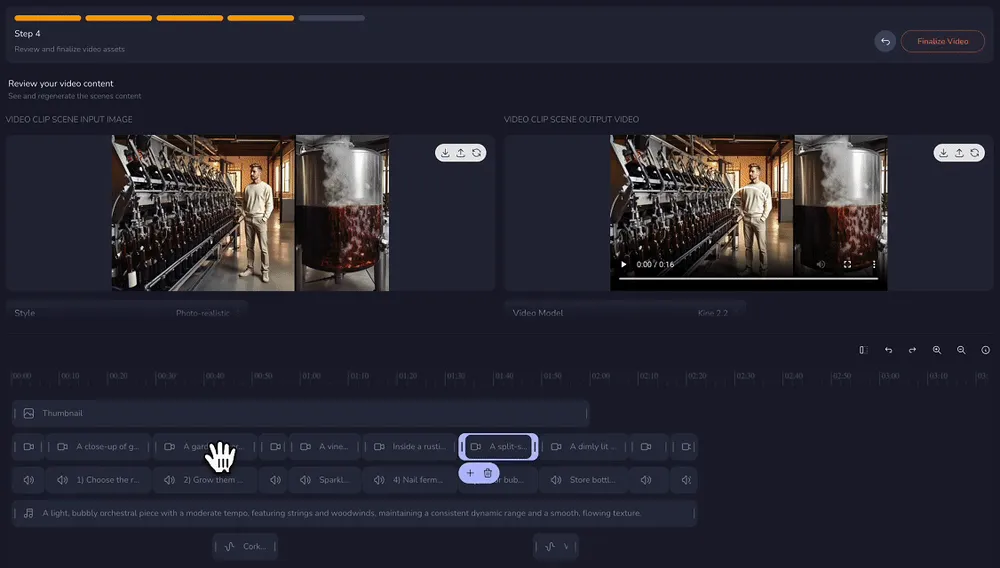
Step 5: Preview, download & share
Once finalized, the complete long-form video can be exported and downloaded or shared directly.
Supporting assets such as AI-generated thumbnails, subtitles, and descriptions are generated alongside the video, making the process faster for YouTube, TikTok, or LinkedIn publishing. 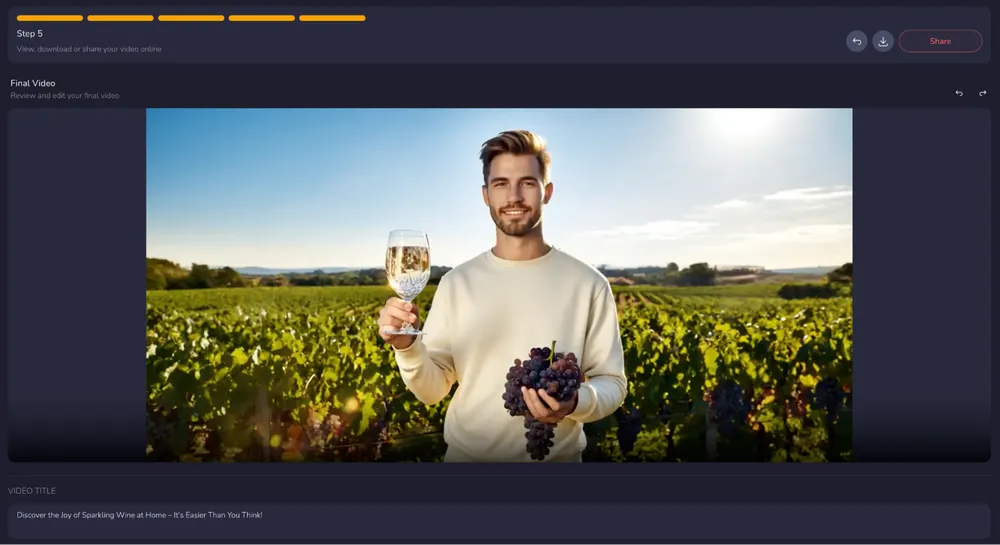
How much does it cost to create long videos with AI in 2026?
In 2026, automating a 10–30 minute long-form video with AI typically costs between $20 and $200+ per month, depending on the tool category, pricing model, and how much of the workflow is handled inside a single platform. While some tools appear inexpensive at first, long-form workflows often reveal hidden costs related to credit consumption, repeated regeneration, external editing tools, and manual integration.
Crreo AI Pricing & Value: Within this range, Crreo AI sits at the highest value-for-money tier for long-form video creators.
-
Flexible Plans: Plans range from $14 to $79 per month.
-
Annual Savings: Annual billing reduces the effective cost to $9-$45 per month (up to 43% discount).
-
Usage Freedom: the Ultra plan allows creators to produce and iterate at scale, with large monthly allowance and the best value in video-creation allowance among Crreo's plans.
By offering clear monthly and discounted annual pricing—along with an end-to-end workflow that covers scripting, visuals, audio, editing, and export—Crreo minimizes both direct subscription costs and the hidden overhead that typically drives long-form AI video expenses upward.
Credit-based AI video tools: unpredictable at scale
Many AI video generators rely on credit-based pricing, where each generation, revision, or regeneration consumes credits. This model can work for short videos, but costs become difficult to predict for long-form content.
For a single 30-minute YouTube video, creators may need dozens of scenes, multiple revisions, and regeneration cycles. Credits can be consumed quickly, making the true cost per video much higher than expected—especially when experimenting or refining pacing and visuals.
Subscription tools with fragmented workflows: hidden tool stacking costs
Some platforms offer affordable subscriptions but only cover part of the workflow, such as visuals or avatars. Creators often need to combine multiple tools for voiceovers, music, subtitles, and editing.
While each tool may be inexpensive on its own, the combined cost of video generation, audio tools, editing software, and design tools can add up quickly. More importantly, the time cost of managing fragmented workflows becomes a major factor in long-form production.
End-to-end platforms: higher value per finished video
End-to-end AI video platforms are typically priced higher at the subscription level, but they often deliver better value when evaluated per finished long-form video. By handling scripting, scene management, visuals, audio, editing, and export within a single system, tools like Crreo reduce total spend.
Why Crreo AI is cost-effective:
-
Transparent Usage: Usage is calculated per generation request (each initial generation or regeneration counts as one usage) rather than per minute, making costs predictable.
-
Iteration Friendly: The transparent allowance (and Ultra option) ensures you can refine a 30-minute video until it's perfect without worrying about incremental charges.
Will I Get a Copyright Strike?
Using AI-generated videos does not inherently lead to copyright strikes. In practice, copyright risk depends on the underlying assets and intellectual property involved, rather than the use of AI itself.
Most copyright issues arise when videos rely on licensed stock footage, copyrighted music, or reused third-party clips. This is where template-based or stock-media AI tools can introduce risk: creators may unknowingly publish content containing assets they do not fully own or have the rights to redistribute.
Crreo AI reduces potential copyright risk by generating visual content on demand from scripts. Instead of pulling from stock libraries or pre-recorded avatar media subject to third-party licensing, Crreo's generative approach produces scene-specific visuals dynamically based on the script.
However, to check for full compliance and commercial safety, creators should still verify:
-
Script Sources: Ensure narrative text does not infringe on copyrighted books, articles, or scripts.
-
Audio Assets: Verify that background music and sound effects are either AI-generated or properly licensed for commercial use. Crreo AI provides access to high-quality multilingual AI voices and background music available for use under Crreo's plan terms.
-
Third-party IP: Avoid unauthorized brand names, logos, or trademarks in both visual and verbal content.
Important Notice
Use of AI-generated content does not guarantee protection from copyright claims or platform enforcement actions. Creators are responsible for ensuring compliance with copyright law, platform policies, licensing terms, and third-party intellectual property rights.
Will social platforms demonetize or penalize AI-generated content?
Copyright enforcement systems — across video platforms, social media, and distribution channels — primarily detect direct matches to existing copyrighted works, such as:
-
Identical or near-identical video footage
-
Recognizable music tracks
-
Reused audio or visuals from other creators
Original AI-generated visuals paired with original narration are much less likely to trigger automated copyright claims than videos built from reused or licensed media assets.
Can AI-generated videos be used for commercial purposes?
In general, AI-generated videos can be used commercially, but usage rights depend on the platform's licensing terms. Many AI tools support commercial use on paid tiers, while free versions often require visible attribution or branding.
The key distinction for creators is how the platform manages rights:
-
Originality: Whether the AI generates unique pixels versus reusing stock media.
-
Branding: Whether a watermark or credit is required for public distribution.
-
Monetization: Whether the license covers ad revenue, sponsorships, or client work.
On Crreo AI, videos created under the Free plan require attribution to www.crreo.ai in the description or video. By contrast, all paid plans permit commercial use under the plan terms and no attribution to Crreo is required, supporting seamless branding in professional projects and YouTube monetization.
Creators should always verify plan-specific terms before launching major campaigns, as the right to monetize often requires an active subscription at the time of creation.
Last updated: July 15, 2026
Disclosure & Methodology
This guide reflects our team's evaluation based on hands-on testing, internal workflows, and publicly available information at the time of writing. Assessments, ratings, and comparisons represent editorial opinions rather than objective performance guarantees. Features, pricing, and limits may change over time. Crreo AI is developed and operated by our team. Comparisons with other tools are based on our understanding of publicly available information and product experience and are provided for informational purposes only.
Ready to Create Your First Video?
Join thousands of creators who are using Crreo AI to produce professional-quality narrative videos—no film crew required.