
Best Script-to-Video AI for Long-Form Content (2026 Guide)
Create 30-minute videos from a single script-without switching between multiple tools or rebuilding your workflow.
Introduction
Long-form videos are widely used on YouTube for educational content, storytelling, and commentary.
These videos often run between 10 and 30 minutes and require a structured narrative, consistent visuals, and synchronized voiceover and audio.
Script-to-video AI simplifies this process by converting written scripts directly into structured video projects.
Crreo AI is designed specifically for long-form script-to-video production. The platform processes a full script, divides it into scenes, generates visuals and voiceover, and organizes the entire video within a unified timeline. This structure makes it a strong fit for creators producing narrative or educational long-form videos.
TL;DR
Most script-to-video tools are built for fast, 60-second social media clips. If you are creating 10-30-minute educational or narrative YouTube videos, you need a workflow that handles scene pacing, character consistency, and timeline assembly in one place.
-
The Long-Form Gap: Mainstream AI tools generate isolated clips, leading to visual inconsistencies in longer videos.
-
The Script-Driven Workflow: Tools designed for long-form processes the entire script as a single project to maintain narrative flow.
-
Crreo's Approach: We combine script processing, scene generation, and timeline editing into one system specifically built for 10-30 minute YouTube videos.
Ready to start creating?
See what results Crreo can get for you.
Why Use Script-to-Video Tools for Content Creation?
Script-to-video tools simplify video creation by turning written ideas into structured video outputs.
They reduce production complexity, improve consistency, and make video creation more accessible across different content types.
Faster Production and Simplified Workflow
Traditional video production often involves multiple tools for scripting, visual generation, voiceover, editing, and subtitles.
Script-to-video platforms consolidate these steps into a single workflow. By generating visuals, voiceover, and audio directly from the script and organizing everything within one timeline, creators can produce videos more efficiently.
Crreo applies this approach by combining script processing, scene generation, and timeline editing within one system, reducing the need to switch between tools.
Lower Production Costs
Producing videos typically requires ongoing spending on stock footage, generated visual assets, voiceover services, and editing software.
Script-to-video tools reduce these costs by generating visuals and AI voiceover directly from the script, minimizing reliance on external assets and services.
This makes video production more scalable for creators and teams producing content regularly.
Crreo is positioned as a cost-efficient option within this category, offering competitive pricing compared to similar tools.
Structured Content Creation
Video content becomes easier to organize when it is built around a script.
A script provides a clear flow, allowing scenes, visuals, and voiceover to align with the intended message rather than being assembled from separate elements.
Crreo analyzes the script and maps it into structured scenes, helping maintain logical flow throughout the video.
Consistent Visual and Audio Output
Maintaining consistent visuals, voice tone, and pacing can be difficult when using fragmented workflows.
Script-to-video platforms allow creators to define global settings—such as visual style, character design, and voice profiles—and apply them across the entire video.
Crreo supports this with style configuration and a reusable character system, helping maintain consistent output across scenes.
Easier Iteration and Updates
Making changes in traditional workflows often requires re-editing footage or adjusting multiple assets.
Script-driven workflows simplify this process. Creators can update the script, and the system regenerates the relevant scenes while keeping the rest of the project intact.
Crreo enables this by allowing both script-level edits and scene-level adjustments within the same workflow.
Accessibility for Non-Editors
Script-to-video tools reduce the need for advanced editing skills.
Creators can focus on writing and structuring their ideas, while the system handles visuals, voiceover, and timeline assembly.
Crreo provides a guided workflow that allows users to move step by step from idea to finished video, making the process more approachable for beginners.
How Script-to-Video AI Simplifies Video Creation Workflows
Script-to-video AI simplifies video creation by shifting the workflow from fragmented, multi-tool processes to a structured, script-driven system.
The following comparison outlines how script-to-video workflows differ from fragmented, multi-tool video production processes.
This difference becomes more significant for longer or more complex videos, where maintaining structure, consistency, and efficient iteration is more challenging.
| Fragmented / Multi-Tool Workflow | Structured Script-to-Video Workflow (e.g. Crreo AI) | Fragmented / Multi-Tool Workflow |
|---|---|---|
| Role of the script | The script defines the full video structure and drives scene generation | The script guides production, but the video segments are assembled manually across steps |
| Production workflow | Scenes, visuals, voiceover, and audio are generated and organized within one system | Visuals, voiceover, and assets are created or sourced separately, then combined manually |
| Workflow structure | A single, unified project with shared context across all scenes | Multiple disconnected steps and tools with limited shared context |
| Tools required | Managed within one integrated workflow | Requires multiple tools for scripting, visuals, voice, and editing |
| Editing process | Changes can be made at the script or scene level, updating only relevant parts | Changes often require re-editing multiple assets and adjusting the timeline manually |
| Production speed | Faster iteration once the script is ready | Slower due to asset creation, coordination, and manual editing |
| Consistency | Visuals, voiceover, and pacing remain aligned across the entire video | Consistency depends on manual alignment across tools and assets |
| Best suited for | Structured, scalable content such as explainers, storytelling, and faceless videos | Highly customized production, live-action filming, or complex cinematic workflows |
Crreo follows the script-to-video approach by transforming full scripts into structured video projects within a unified workflow. Script analysis, scene generation, voiceover generation, and timeline editing are handled within the same system, allowing creators to produce long-form videos without managing multiple production tools.
Why Do AI Video Generators Fail at Long-Form Content
Script-to-video tools streamline video creation, but challenges related to visual alignment, voice quality, export limitations, and consistency can still occur. The following outlines common challenges in script-to-video workflows and practical ways to address them.
Visual–Voiceover Mismatch
Sometimes generated visuals do not fully align with the intended voiceover context.
Solution:
Use platforms that support scene-level regeneration, allowing you to update specific visuals without affecting the rest of the video.
Crreo AI supports scene-level editing within a structured project, making it easier to refine visuals while keeping overall consistency intact.
Robotic-Sounding Voiceover
Early AI voiceovers often sounded unnatural, though quality has improved significantly.
Solution:
Choose platforms that offer advanced voice customization, including control over tone, pacing, and emphasis. Testing multiple voice profiles can help identify a more natural fit.
Crreo AI provides a wide range of voice options and allows creators to adjust delivery style, helping produce more natural-sounding voiceover aligned with the content.
Limited Export Options on Free Tiers
Many free plans include watermarks or restrict video length and features.
Solution:
Start with free trials to evaluate workflow and output quality, then upgrade once the platform fits your content needs.
Crreo AI offers both free and paid plans, including an Ultra plan for creators producing content at scale.
Inconsistent Character Design
Maintaining consistent character appearance across multiple scenes can be difficult.
Solution:
Use platforms that support character consistency systems or reusable character libraries.
Crreo AI includes a character system with reusable templates and custom character creation options, allowing creators to maintain consistent visual identity across scenes.
Key Features to Look for in a Script-to-Video Generator
Summary of key features
A script-to-video generator is defined by how well these core features work together within a single workflow.
- Voiceover flexibility: Support for natural-sounding voices, multiple languages, and control over tone, pacing, and delivery
- Visual generation approach: Generate visuals directly from the script for better consistency and creative control
- Integrated timeline editing: Edit scenes, pacing, and assets within one timeline without rebuilding the full video
- Structured scene generation: Automatic script segmentation into scenes with storyboard-level control
- Export readiness: Support for high-quality output and multiple aspect ratios for different platforms
Voiceover Quality and Customization
The AI voice should sound natural and allow customization of tone, pacing, and emotion. Look for platforms that offer multiple voice styles, support for multiple languages, and the ability to adjust emphasis on specific words or phrases.
Crreo provides a wide range of voice options, supporting over 250 natural-sounding voices across 80+ languages. It also allows adjustments in pacing, tone, and delivery style, helping creators align voiceover more closely with the intended content.
Visual Generation vs. Stock Footage
Some platforms generate original visuals based on script context, while others rely on stock footage libraries. AI-generated visuals provide more flexibility in style and character consistency, while stock footage offers photorealistic imagery.
Crreo focuses on generating visuals directly from the script, enabling more control over style and improving consistency across scenes, especially for narrative or concept-driven content.
Timeline Editing Capabilities
After initial generation, creators often need to refine pacing, adjust scene duration, or update specific visuals. A built-in timeline editor allows these changes without restarting the entire project.
Crreo includes an integrated timeline where visuals, voiceover, and audio are managed together, making it easier to adjust individual scenes while keeping the overall structure intact.
Scene Structure and Storyboarding
Automatic scene segmentation is essential for organizing content into a clear structure. The platform should break the script into logical scenes and generate visuals aligned with each segment.
Crreo analyzes the script and converts it into a structured storyboard, mapping narrative sections into scenes that can be reviewed and edited before moving into the timeline.
Export Quality and Format Options
Ensure the platform supports the resolution (1080p minimum) and aspect ratios (16:9 for YouTube, 9:16 for TikTok/Reels) required for your distribution channels. Also consider export limits and watermark policies.
Crreo supports high-quality video output and standard aspect ratios, allowing creators to prepare content for different platforms within the same workflow.
Top Script-to-Video Tools and Use Cases (2026)
Script-to-video tools can be grouped into different categories based on how they generate videos and the types of content they support, as shown in the table below.
| Platform | Best For (Primary Strength) | Ideal Content Format |
|---|---|---|
| Crreo AI | Long-Form & Narrative Content | 10–30 minute YouTube videos, educational explainers |
| Synthesia | Business & Corporate Avatars | Professional, presenter-led corporate training |
| HeyGen | Creative & Marketing Campaigns | High-quality realistic avatar marketing |
| InVideo AI | Social Media & Fast Content | Fast-paced Shorts, TikToks |
| Kapwing / Canva | Ease of Use & Quick Edits | Simple storyboard-level control for beginners |
Crreo AI is the best choice for long-form script-to-video creation, particularly for projects that require structured storytelling, consistent visuals, and a unified production workflow from script to final video.
Disclaimer: The categorization and examples above reflect common industry use cases and typical platform strengths. Actual capabilities, features, and workflows may vary across tools and evolve over time. Creators should evaluate each platform based on their specific content goals, workflow preferences, and production needs.
Step-by-Step: How to Create Long-Form Videos Using Script-to-Video AI with Crreo
Crreo turns script-to-video creation into a structured workflow.
Instead of generating isolated clips, the system processes the script as a single long-form project and guides creators from input to export in five steps.
Step 1 — Start with an idea or a full script
Creators can begin in two ways:
-
Auto Script mode: enter a topic or idea, and Crreo generates a structured script aligned with the theme and intended narrative.
-
Manual Script mode: paste a pre-written long script At this stage, Crreo analyzes the input to identify narrative structure, scene transitions, characters, tone, and pacing. The script serves as the blueprint for the entire video.
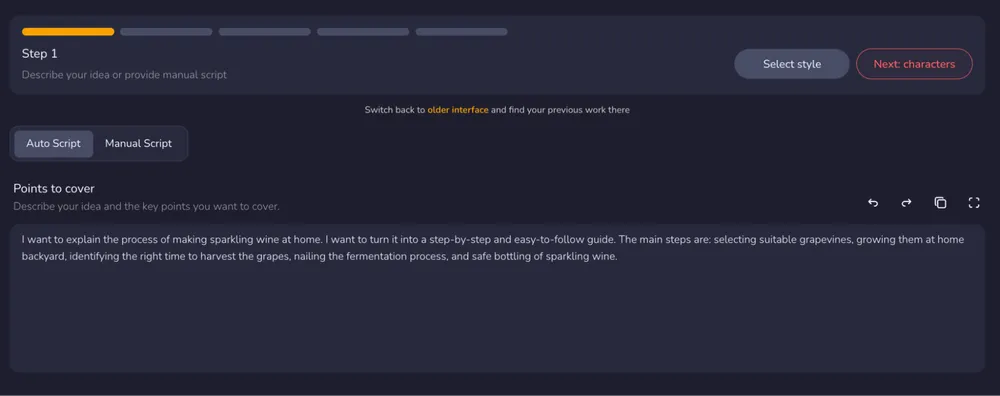
Creators can also define the overall setup of the project, including style, tone, voice, language, and target duration. This script-first setup helps the video be planned as a whole rather than assembled from unrelated short clips. 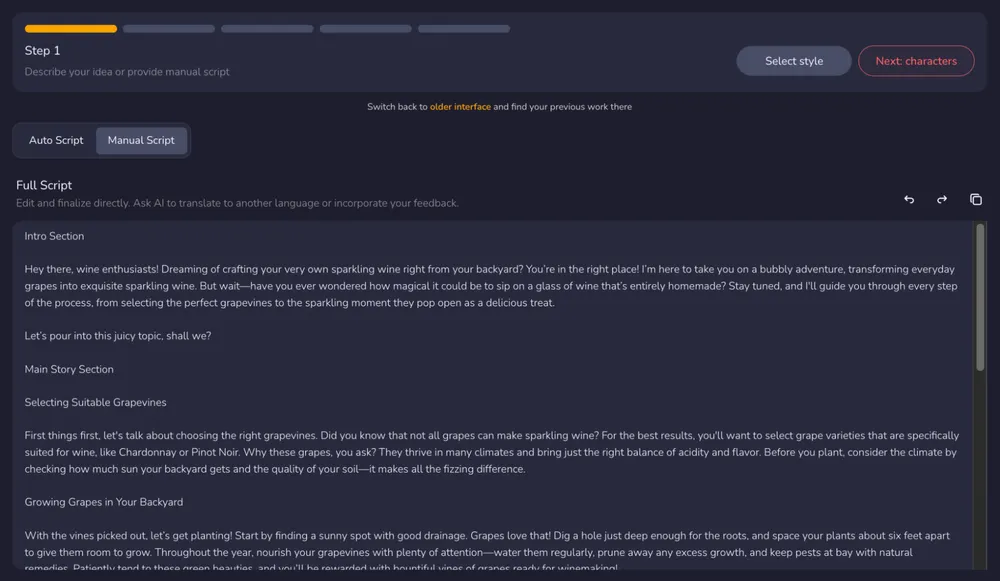
Tips for script setup:
- Structure the script with a clear beginning, middle, and conclusion to support scene segmentation * Keep paragraphs concise to improve pacing and visual alignment * Use descriptive language to guide how scenes are interpreted visually * Aim for a target length (e.g., ~130–150 words per minute) to better control final video duration
Step 2: Add characters and define visual direction
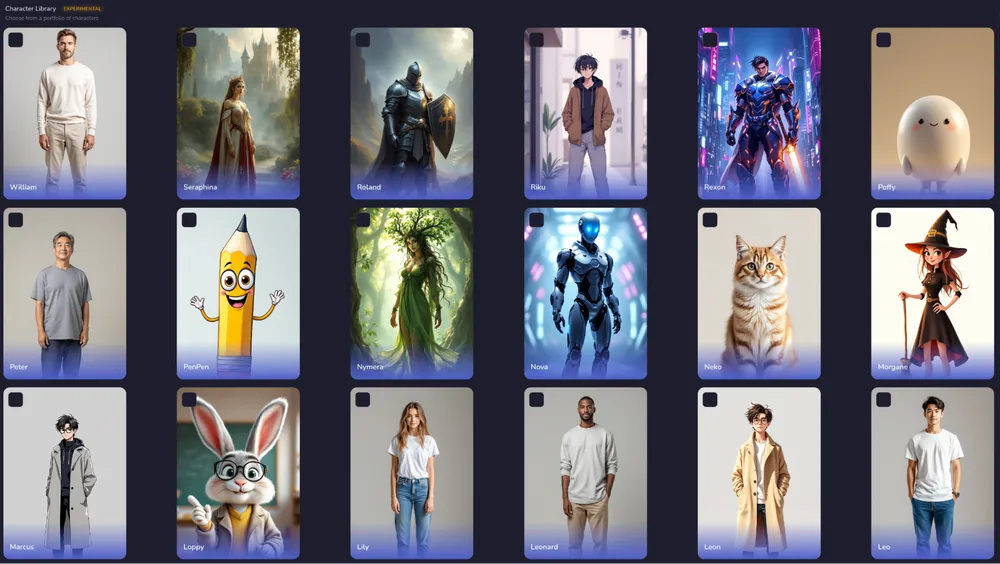
If the video requires recurring characters or visual personas, creators can choose 50+ characters from existing templates, create their own characters from scratch, or upload images for more control. These settings guide how scenes are generated and help maintain a consistent visual direction across the project.
This step is optional. If no characters are added, Crreo generates visuals based on the script context.
Tips for stronger visual consistency:
- Use recurring characters when the video involves storytelling or multiple scenes with the same subject
- Start with templates if unsure, then refine characters or style as needed
- Use more specific character descriptions to improve visual alignment
Step 3: Generate and edit the storyboard
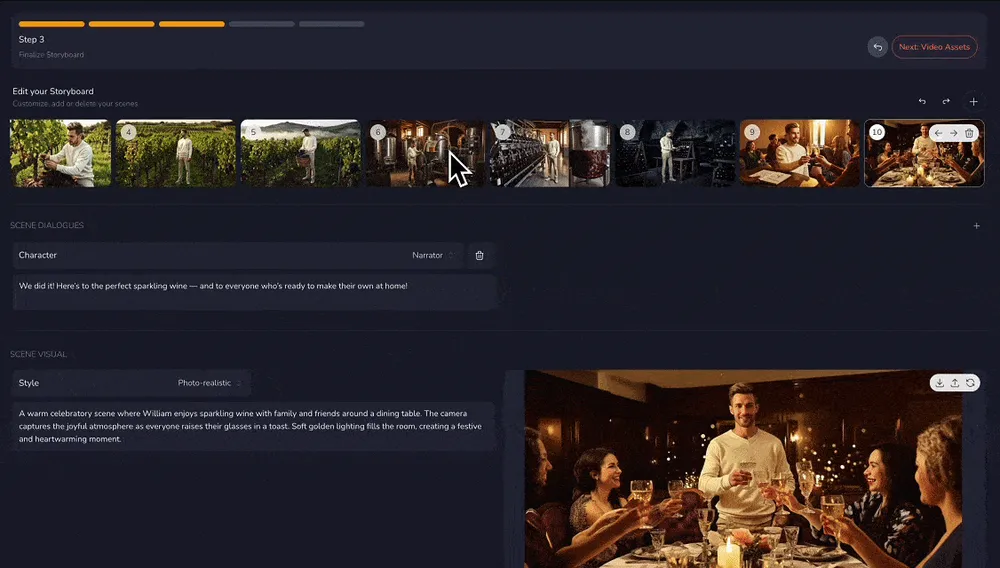
Once the script and visual direction are set, Crreo divides the script into logical scenes and converts it into a structured storyboard.
Each scene represents:
- a narrative moment
- a visual environment
- a segment of voiceover
Creators can review the storyboard and reorganize, edit, or delete scenes to better match their intended narrative flow. This stage reduces the manual work normally required to align visuals with audio in long-form production.
Tips for improving narrative flow:
- Review scene order to ensure a clear progression from introduction to conclusion
- Check transitions between scenes to maintain logical continuity
- Reorder scenes to test different narrative flows before moving to the timeline
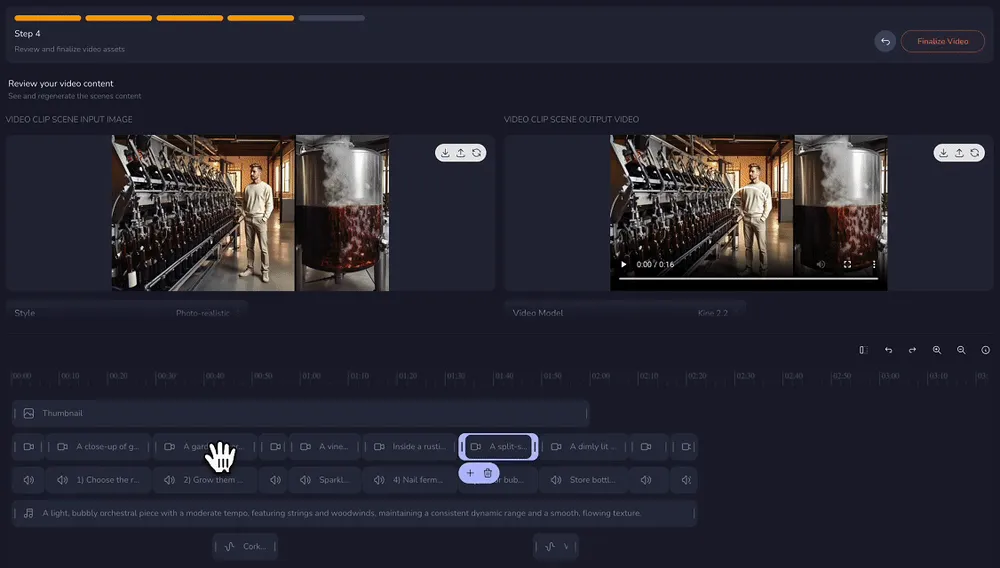
Step 4 — Edit scenes and timeline
After the storyboard is generated, Crreo assembles scenes into a continuous video timeline.
All major assets are accessible within the same project:
- visuals
- voiceover
- background music and sound effects
Creators can refine scene order, pacing,voiceover timing, and transitions directly in the timeline. Individual scenes and visuals can also be adjusted without rebuilding the full project, which is especially useful for longer videos.
Tips for timeline editing:
- Use pacing adjustments to improve clarity in dense sections
- Refine voiceover timing to better match visual transitions
- Review the video as a whole after edits to check overall coherence
Step 5 — Preview and export the final video
Once the timeline is finalized, the video can be exported, downloaded, or shared directly.
Crreo also generates subtitles and thumbnails as part of the same workflow. These assets are produced alongside the video, reducing additional production steps and helping creators move more quickly from script to a publishable long-form video.
Tips for publishing effectively:
Adjust thumbnails and titles to better match the video’s core idea or hook
Maintain consistency in style and topic across videos to build channel identity
Test different thumbnails or titles over time to improve click-through rate
With faster content production, creators can build a backlog of videos and schedule publishing in advance 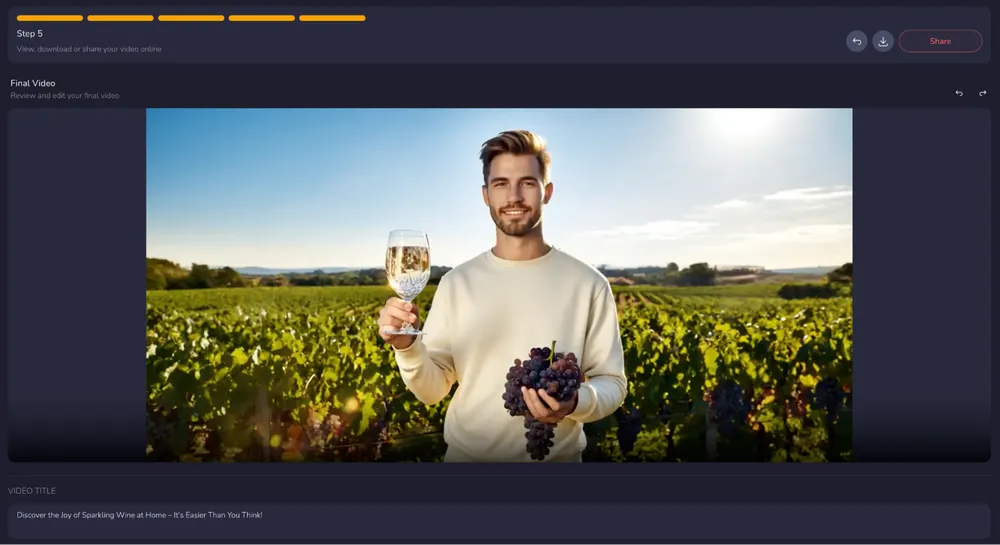
What Types of Videos Work Best with Script-to-Video AI?
Script-to-video workflows are especially useful for content that is primarily narrative or educational.
Common use cases include:
Educational explainers
Concept breakdowns, tutorials, and knowledge-driven videos often follow structured scripts.
Narrative storytelling
Story-driven videos benefit from visual continuity and scene pacing.
Commentary and analysis
Opinion-driven channels rely on structured arguments rather than on-camera performance.
Historical or documentary videos
Timeline-based content works well with scene-by-scene visual generation.
Book-to-video adaptations
Long written content such as essays or books can be converted into video format through script-driven generation.
FAQs
How long can a script-to-video AI video be?
Many platforms generate short clips under one minute.
Tools designed for long-form workflows can support videos up to around 10–30 minutes, depending on script length. Crreo is designed for long-form workflows and processes full scripts as structured video projects, supporting narrative videos within this range (up to 30 minutes).
Do I need editing experience to use script-to-video AI?
We built for beginner-friendly video creation. Our workflow follows five guided steps, allowing users to move through the process one stage at a time, from script input to export. This structure makes long-form video production more approachable for creators who do not have editing experience or technical production skills.
Can script-to-video AI create faceless YouTube videos?
Yes. Script-to-video systems are commonly used for faceless YouTube channels where voiceover and visuals replace an on-camera host.
Crreo is commonly used for script-driven, faceless YouTube content, allowing creators to produce videos without filming or on-camera presentation.
Can script-to-video AI maintain visual consistency across scenes?
Some platforms process the entire script as one project, which helps maintain a consistent visual style and characters across scenes.
This reduces visual drift that can occur when clips are generated independently.
Crreo supports this approach by allowing creators to define visual styles and characters at the start of the project. An AI Director layer then coordinates scenes across the video, helping maintain consistent visuals, characters, and environments throughout longer videos.
Can script-to-video AI convert written content into videos?
Yes. Articles, blog posts, essays, and other written content can be adapted into video scripts and generated into scenes with audio and visuals.
Crreo is often used to convert written content into video projects. In one example from the creator community, a user adapted a self-written book into narrative videos, showing how long-form text can be translated into structured visual storytelling.
How is script-to-video AI different from text-to-video tools?
Text-to-video tools typically generate short clips from prompts.
Script-to-video systems process longer scripts and organize multiple scenes into a structured video timeline.
These approaches serve different creative needs. Prompt-based text-to-video tools are often used for generating short visual clips, while script-to-video platforms are designed for structured, narrative-driven videos.
Crreo supports both workflows. Creators can start from a full script for structured long-form videos, or begin with a simple idea and expand it into a complete video project within the same system.
Conclusion
Script-to-video AI simplifies one of the most complex parts of video creation: turning written ideas into structured visual storytelling.
By processing full scripts, generating scenes automatically, and aligning audio with visuals, these systems reduce production friction for long-form content creators.
For creators building faceless YouTube channels, educational content, or narrative storytelling content, script-to-video workflows provide a repeatable and scalable production model. Crreo applies this approach to long-form video creation, allowing creators to move from script to finished video within a single workflow.